McKesson Clinical Workflow Automation · Product Strategy · Decision Support · Human Oversight McKesson · Provider Solutions Technology
Role Research, Strategy & Design Lead Tools Figma Make · Replit · FigJam · FullStory

Reimagining treatment readiness
for oncology operations.

Lynx's highest-traffic Queue → Dispense workflow looked like a two-step modernization problem. Research showed something larger: oncology teams were using the Queue to coordinate treatment readiness work the product did not otherwise support. As research, strategy, and design lead, I reframed the effort from improving a transaction flow to shaping a readiness-driven decision-support workflow — helping users understand who is ready for dispense, what is blocked, what medication may be needed, and where human judgment is required.

System Mismatch

Lynx was structured around transactions. Clinics were structured around treatment readiness.

Outcome

Established treatment readiness as the first workflow modernization anchor for Lynx.

The work shifted the modernization direction from improving a high-traffic Queue → Dispense flow to supporting treatment readiness as the organizing model for future workflow design.

Product direction
Shifted from modernizing the Queue page to supporting treatment readiness
Cross-functional alignment
Product, Engineering, Customer Success, Account Management, and UX aligned before engineering commitment
Modernization foundation
Reusable patterns identified for readiness states, demand forecasting, vial optimization, exception recovery, and human review
Validation approach
Live prototypes tested with Customer Success and Account Managers before customer validation
Impact at a Glance

Six capabilities that moved from manual work to supported workflow

Readiness-driven dispense workflow

The concept moved away from manual Queue construction toward automatically surfacing who is ready for dispense, who is blocked, and what needs attention.

Medication demand forecasting

Helps inventory and ordering staff understand what high-cost medications may be needed before treatment day so practices can prepare without overstocking.

Vial optimization

The system recommends the optimal vial combination to minimize billable waste and cost. Users review, adjust, or override before ordering or dispense.

Role-aware workflow support

Separates planning decisions (inventory and ordering staff before treatment day) from point-of-care confirmation (dispensing staff at the cabinet).

Exception recovery

Dose changes, schedule changes, and readiness gaps are treated as expected workflow states — resolved in place rather than requiring users to delete and rebuild queued work.

Modernization foundation

Identified reusable patterns for readiness states, recommendation explanation, human review, and future AI-supported workflows across Lynx.

From Queue management to treatment readiness

Current workflow

Users manually prepare, queue, check, report, order, recover from changes, and dispense across Lynx and outside tools.

Future direction

Lynx surfaces readiness, medication demand, vial guidance, exception recovery, and human review before dispense.

Context

A Workflow Connected to Physical Point-of-Care Operations

Lynx supports medication purchasing, inventory, and dispense workflows for oncology practices — connected to EHR systems, purchasing workflows, inventory data, and physical pharmacy cabinets. The workflow is not only digital: it affects what happens at point of care.

Inventory & ordering staff need to

  • Know what high-cost medications to prepare before treatment day
  • Estimate demand without over- or under-ordering
  • Coordinate across sites and suppliers

Dispensing staff need to

  • Confirm the right medication, dose, and vial configuration
  • Verify cabinet access and physical inventory at point of care
  • Resolve changes without rebuilding queued work
Why This Matters

Treatment readiness sits between two risks: under-ordering means the patient arrives without the right drug on hand; over-ordering means the practice carries expensive inventory it can't use or bill for. The workflow had to help staff navigate that window every day.

System at a glance

People

Inventory and ordering staff · Infusion nurses · Pharmacy technicians · Remote coordinators · Account managers

Systems

Lynx · EHR · Customer Center · Cabinets · Reports · Spreadsheets

Core decisions

What to order · Who is ready · Which vials to use · What changed · When it is safe to dispense

Constraints

High-cost medications · Tight inventory margins · EHR variability · Day-of order visibility · Cabinet access · Human oversight

The Workflow Opportunity

Expanding the workflow from dispense to readiness.

Queue and Dispense were the highest-traffic areas in Lynx — a clear starting point for modernization. The initial assumption: a two-step workflow problem. Research showed the real work started much earlier.

Before a single patient reached the Queue, staff were already:

Lynx primarily supported the final transaction. Most of the readiness work happened outside the product.

The Reframe

When hours of preparation sit outside a two-minute dispense action, the opportunity is bigger than usability. It is the product boundary — and moving it meant redesigning how Lynx understood treatment readiness, not just how the Queue page looked.

1. Give readiness work a clear home

Treatment readiness includes confirming patients, orders, drugs, inventory, changes, and staff readiness. The opportunity was to support this daily preparation work directly in Lynx.

2. Separate planning from same-day dispense

The Queue was acting as a planning tool, demand signal, readiness monitor, exception recovery space, same-day execution list, and cabinet access trigger. The opportunity was to separate those jobs into clearer workflow moments.

3. Support high-stakes calculations

Vial selection, demand estimation, and cross-site inventory checks were performed by hand. These calculations affect cost, waste, purchasing, and clinical readiness every day.

4. Resolve changes without rebuilding work

Dose changes, schedule changes, and validation errors needed clearer recovery paths, so users could resolve changes in place instead of deleting and rebuilding queued work.

Research: Data, Findings, Insight

Understanding how people actually used Queue and Dispense

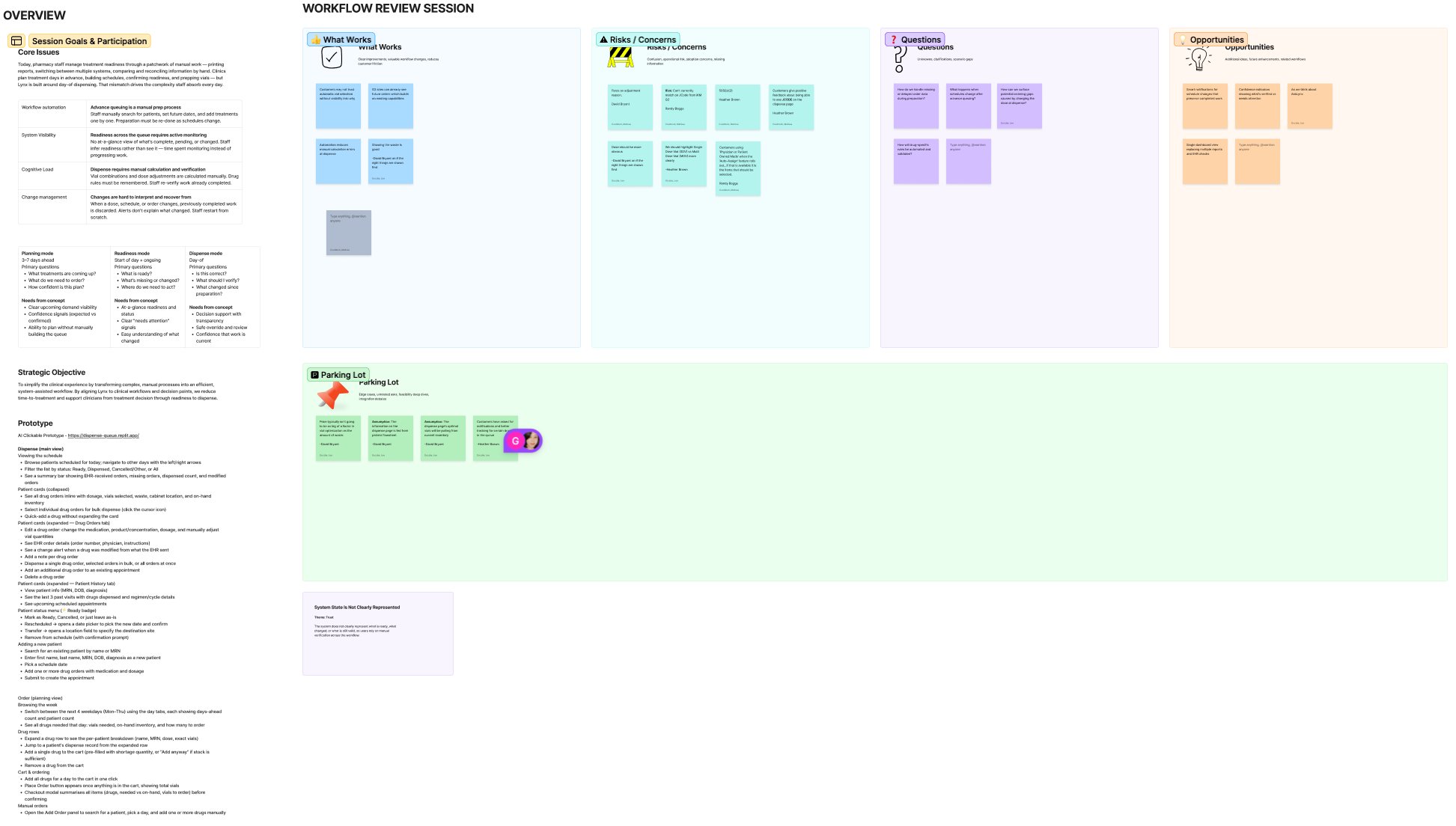
We used customer interviews, workflow discovery, journey mapping, SME conversations, usage signals, and concept validation to understand how people actually used one of the highest-traffic areas in Lynx. Each method revealed a different layer of the same finding: the real work started before the Queue, and most of it happened outside Lynx entirely.

Customer interviews and workflow discovery

Why this method: We needed to understand what users were trying to accomplish with Queue and Dispense, not just how the workflow was intended to work.

What it revealed: Users were relying on Queue and Dispense to manage broader treatment readiness work, including preparation, demand estimation, inventory checks, changes, and dispense coordination.

Journey and workflow mapping

Why this method: The work spanned multiple roles, systems, and time horizons, so we needed to map what happened before, during, and after dispense.

What it revealed: Treatment preparation began before the Queue step and often happened across EHRs, reports, spreadsheets, Customer Center, Lynx, and memory.

SME conversations

Why this method: We needed practice-level context around EHR integration, inventory constraints, medication ordering, and how different roles coordinate work.

What it revealed: The workflow had to support different customer setups, including practices where future order visibility is limited or unavailable.

Concept validation

Why this method: We needed to test whether a readiness-driven direction made sense before engineering commitment.

What it revealed: Internal reviewers needed visible reasoning, role-aware information density, clear override paths, and support for sites where future order visibility could not be assumed.

Research artifact

Treatment readiness work happened before, around, and outside the Queue.

Three participants · Anonymized across Rheumatology/NextGen, Oncology/Varian, and Oncology/iKnowMed G2 contexts.

● In Lynx ↗ External / manual bridge ⚠ Pain point

Participant 1

Rheumatology · NextGen

Participant 2

Oncology · Varian

Participant 3

Oncology · iKnowMed G2

Start of Day

Build the Schedule

● Opens Dispense page, navigates to patient list

↗ Prints patient list from NextGen (when working); manual entry when down

⚠ Interface fails regularly — full manual fallback, no warning

● Not in Lynx at this step

↗ Prints schedule from Varian (scheduling only); opens EMR in second screen

⚠ Orders not visible in Varian — must open EMR separately for every patient

● Selects date range in Patient Orders; hits 'Load Patients and Items'

↗ Pulls visit list from InoMed dashboard report; prints for manual comparison

⚠ No way to see which patients are not yet queued

Verify Insurance & Approval

● Checks prior dispense history in Dispense tab

↗ Checks EMR for current approval status

⚠ Two screens open at all times — manual reconciliation per patient

● Checks History tab for prior regimen

↗ Opens EMR per patient; billing team emails about insurance changes

⚠ Year-start high risk: plan changes, formulary switches — manual check every patient

● Not done in Lynx — G2 orders carry approval status

↗ G2 orders feed carries approval — visible in Lynx orders tab

During the Day

Queue Patients

● Dispense → search patient → History → confirm drug/dose → Queue (~4 hrs/morning)

↗ EMR open side-by-side; printed list as checklist

⚠ No forward schedule view — queue built patient by patient

● Dispense → select patient → History → select vials → Queue (30–45 min for 50–70 patients)

↗ EMR open; vial math cheat sheets on wall; manufacturer dosing calculator

⚠ Vial selection entirely manual — system provides no recommendation

● Patient Orders → date range → Load → queue each patient; clicks 'Verify EHR Order'

↗ InoMed visit list — printed or on screen — manual comparison

⚠ EHR validation errors show no diff — delete and re-queue even when nothing has changed

Handle Day-of Changes

● Delete queued entry → re-enter manually after change

↗ Triage nurse calls with dose changes / cancellations

⚠ No change propagation — full manual re-entry every time

● Delete → recalculate vials → re-queue

↗ Email from triage nurse; direct calls for same-day add-ons

⚠ Dose reduction requires manual vial recalculation and full re-queue

● Delete and re-queue when EHR order flagged; chart message workflow for interchanges

↗ Email / Teams: preferred drug change notifications; InoMed chart messages

⚠ Biosimilar substitution awareness entirely email-dependent — no system flag

Drug Ordering & Inventory

● Reviews queue report for demand; orders via Purchase Management

↗ Customer Center for shortage / allocation notices

⚠ Demand estimation entirely manual — no forecasting in Lynx

● Reviews queued work to estimate ordering need

↗ Customer Center; allocation tracking; site coordination

⚠ Multi-site allocation coordination entirely outside Lynx

● Queue reports used to estimate demand; cart and purchase management

↗ Customer Center; shortage notices; overstock lists

⚠ Medication demand interpreted manually — no Lynx forecasting

End of Day

Dispense and Verify

● Queue → dispense confirmation → cabinet access

↗ Printed patient sheets; physical vial count; barcode scanning

● Dispense action; cabinet release

↗ Physical vial verification; barcode scan at cabinet

● Queue → dispense confirmation; cabinet access gated on queue status

↗ Physical verification; printed patient sheets

Reconcile and Close Out

● Runs Superbill report; checks billing, cost, inventory; clears Queue

↗ USON month-end: manual Excel export per facility, upload to portal

⚠ Month-end reporting manual per-facility — not consolidated in Lynx

● Runs Superbill + Partial Vial Reconciliation; clears Queue

↗ MAR update: manually enters dispense data back into EMR

⚠ Epic HL7 is one-way — dispense data doesn't flow back to MAR; manual double entry daily

● Clears Queue; runs queue report for next-day planning

↗ Techs update Smartsheet overstock list; expiration date review at month-end

⚠ Overstock list maintenance is daily manual work — data Lynx already has

Research Insight

Treatment readiness was not a single Queue step. It was a multi-day workflow spanning planning, medication demand, inventory checks, change handling, vial decisions, physical verification, and dispense — most of it happening outside Lynx. That gap was the design opportunity.

Anonymized journey map showing how treatment readiness work spans Lynx, EHRs, reports, spreadsheets, manual bridges, and pain points before and during dispense. Three participant contexts: Rheumatology/NextGen, Oncology/Varian, Oncology/iKnowMed G2.

What the Research Changed

From Queue modernization to a readiness-driven workflow.

Research started with one question: how should we modernize Queue → Dispense? It ended with a different one: how might Lynx support treatment readiness before users manually build a Queue?

What Research Revealed
  • Queue and Dispense were being used to coordinate readiness work — not just complete transactions
  • Users managed demand estimation, inventory checks, vial calculations, and change recovery in a tool not designed for any of it
  • The Queue had become a manual planning layer for readiness work Lynx didn't otherwise support

That shifted direction from modernizing the Queue page to exploring a readiness-driven workflow — one where Lynx surfaces who is ready, what is blocked, what medication may be needed, and where human review is required.

The Reframe

Lynx was structured around transactions. Clinics were structured around readiness.

The current workflow made sense if the primary job was completing a dispense transaction. But clinical teams were solving a broader readiness problem before that transaction could happen.

What clinics need to answer before treatment

Which patients are coming?
What treatments are likely?
What drugs and quantities are needed?
What changed since the last review?
What inventory is available?
What needs to be ordered?
What can be safely dispensed?
Where does a human need to review or override?
Directions Considered

Exploring how far modernization needed to go

The ideation question changed as we learned more. At first: How might we improve the Queue → Dispense flow? After research and SME review: How might Lynx identify treatment readiness before users manually build a Queue?

Direction considered: Modernize the existing Queue page

What we learned: it could reduce friction in the current interface, but users would still have to manually determine who belonged in the Queue, what was missing, what needed to be ordered, and whether the patient was actually ready for dispense.

Direction considered: Add readiness indicators to the Queue

What we learned: it would improve visibility, but it would keep the Queue as the organizing model even though readiness work begins before a patient should be queued.

Direction chosen: Readiness-driven dispense workflow

The system should identify and surface readiness instead of making users manually construct a Queue. This better supports planning, medication availability, vial optimization, exception recovery, and point-of-care dispense.

Systems Complexity

Designing for real-world workflow variability

Readiness varies by customer setup: EHR integration, order visibility, scheduling data, and workflow constraints all affect what Lynx can know before treatment day. The design had to work across all of them.

EHR integration variability

  • Integration ranges from fully connected to manual-only
  • Workflow needed to support all levels without degrading for less-integrated sites

Day-of order visibility

  • Some practices only see orders in Lynx on the day of treatment
  • Staff use forward schedule data to estimate demand manually
  • Readiness support could not depend on confirmed orders alone

Multiple user roles

  • Pharmacy operations, infusion nurses, pharmacy techs, and remote coordinators all interact with the same workflow
  • Each role has different information needs and decision authority at different points

Physical cabinet dependency

  • Dispense is tied to physical cabinet access — not purely a digital workflow
  • Sequencing, confirmation, and recovery paths affect real point-of-care operations

Customer setup affects what Lynx can know before treatment day

Customer setup

Strong EHR integration
Day-of order visibility
Limited or no integration

What Lynx may know early

Schedule + orders
Schedule before orders
Manual inputs or reports

Design implication

Surface readiness earlier
Forecast with caveats
Support review and override

Design Direction

Making dispense readiness visible before treatment day

The design direction moved toward a readiness-driven workflow — automatically surfacing who is ready for dispense, what is blocked, what medication may be needed, and where human review is required.

Design Principle

The goal was not to automate clinical judgment. The goal was to reduce the manual coordination and calculation staff must do before they can make informed decisions. The system carries the work. Humans retain review, adjustment, and control.

Make readiness visible earlier

  • Surfaces who is ready for dispense, who is blocked, and what is missing
  • No manual Queue construction — readiness determined by the system
  • Available before the patient arrives, not only at point of care

Automate advance ordering preparation

  • Translates upcoming treatment demand into order-ready items
  • Reduces manual burden: no more running reports and adding medications to cart by hand
  • Staff retain review and approval before any order is placed

Recommend vial combinations with human review

  • System calculates the optimal vial combination — users review, adjust, or override
  • Reduces cognitive load and error risk on high-stakes, high-cost decisions
  • Supports tighter inventory margins by minimizing billable waste

Separate planning from point-of-care confirmation

  • Ordering staff work ahead of treatment day; dispensing staff confirm at the cabinet
  • Each role sees the information density they need — not the same view forced on everyone

Support changes without rebuilding work

  • Dose and schedule changes treated as expected states, not errors
  • Resolved in place — no deleting and rebuilding queued work

Preserve human judgment and override

  • System surfaces recommendations and reasoning — users decide
  • Human approval required before ordering and before dispense
  • The system carries the calculation. Humans retain control.

Future-state screens created in Figma Make and Replit to test workflow direction, reasoning visibility, and human review before engineering commitment.

1. Surface medication demand before treatment day

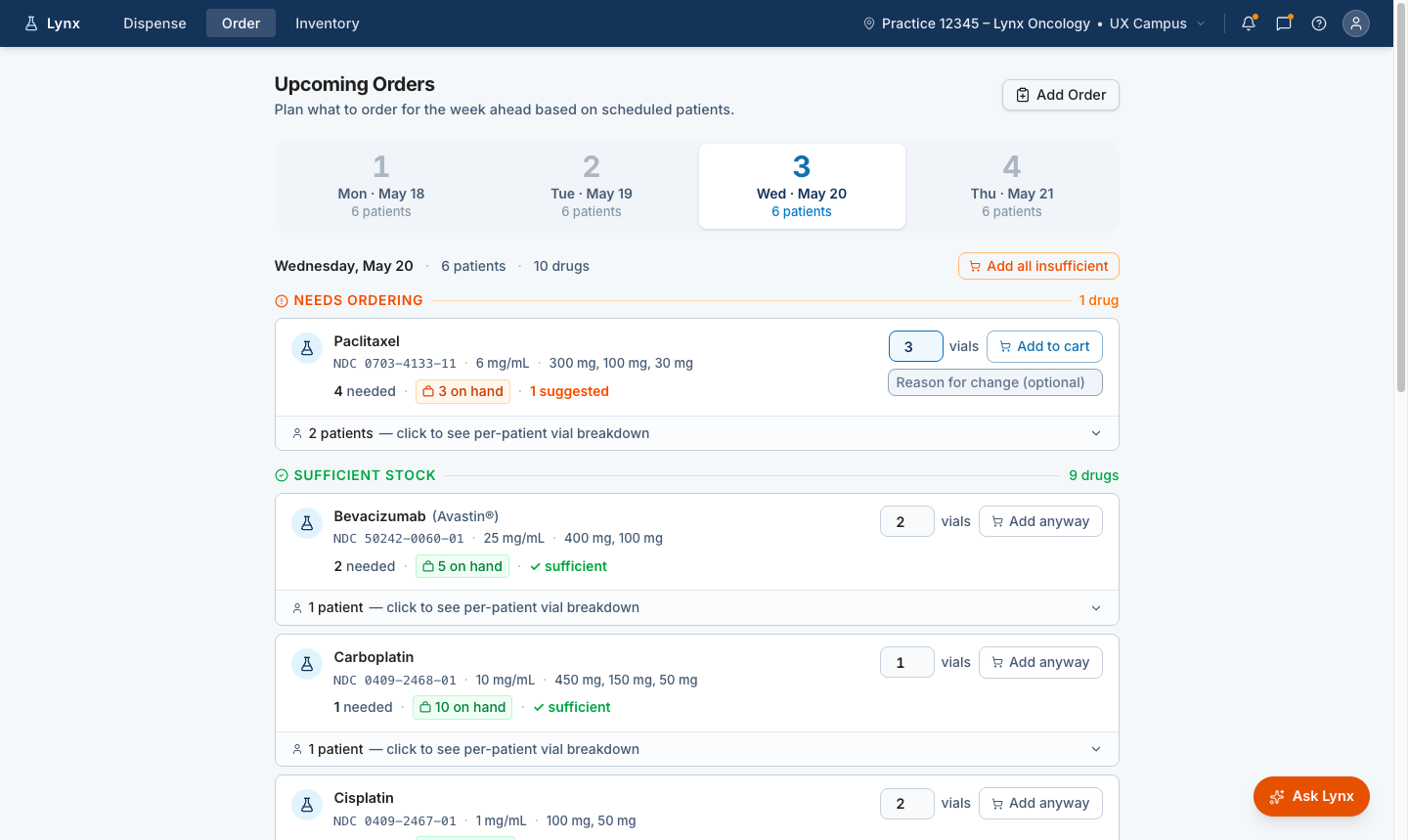
Readiness does not start at dispense. For inventory and ordering staff, the workflow begins days earlier with medication demand, inventory checks, and ordering preparation. The prototype explores how Lynx could surface upcoming demand and turn it into reviewable order actions before treatment day.

Future-state Lynx order planning screen showing upcoming treatment days, medications that need ordering, on-hand inventory, suggested vial quantities, and add-to-cart actions.
Advance ordering window Staff can review upcoming treatment days and plan medication needs before the patient arrives.
Medication demand Lynx surfaces which high-cost medications may be needed based on scheduled patients and treatment demand.
Inventory context On-hand inventory and suggested quantities are shown together, helping staff prepare without overstocking.
Human review before cart Users review suggested quantities and add items to the cart when ready. The system prepares the decision, but staff approve the action.

Future-state order planning view showing how Lynx could translate upcoming treatment demand into recommended order actions while keeping staff in control of review and cart decisions.

Future-state Lynx order planning screen showing a suggested medication quantity added to the cart with a place order action.

Reviewable cart action

Suggested quantities can be adjusted and added to the cart, keeping ordering staff in control before an order is placed.

Future-state Lynx order planning screen showing a per-patient vial breakdown for a medication that needs ordering.

Patient-level transparency

Staff can expand the recommendation to see the patient-level vial breakdown behind the suggested order quantity.

The recommended order flow keeps the user in control by showing suggested quantities, cart actions, and patient-level reasoning before order placement.

2. Show who is ready for dispense

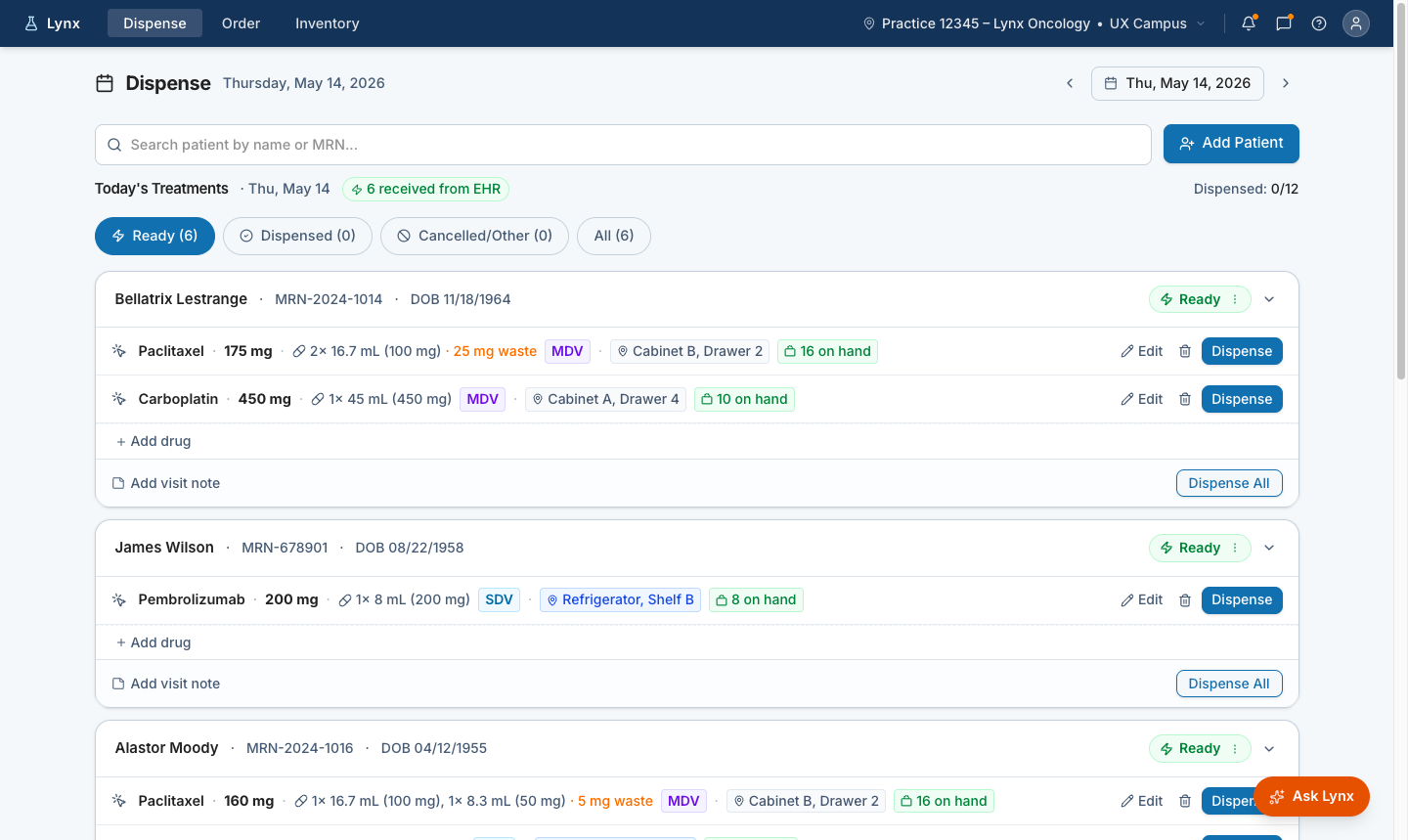
Future-state Lynx dispense screen showing patients ready for treatment on a selected day, including medications, vial configuration, inventory on hand, storage location, and dispense actions.
Ready for dispense Patients ready for the selected treatment day are surfaced automatically instead of requiring staff to manually build and monitor a Queue.
Medication detail Dose, vial configuration, package type, storage location, and inventory availability are visible before dispense.
Human confirmation Dispense remains an explicit user action. Staff can review, edit, add notes, or dispense when ready.

Future-state dispense view showing which patients are ready for treatment on the selected day, with medication, inventory, storage location, and dispense actions surfaced in one place.

3. Recommend vial combinations with human review

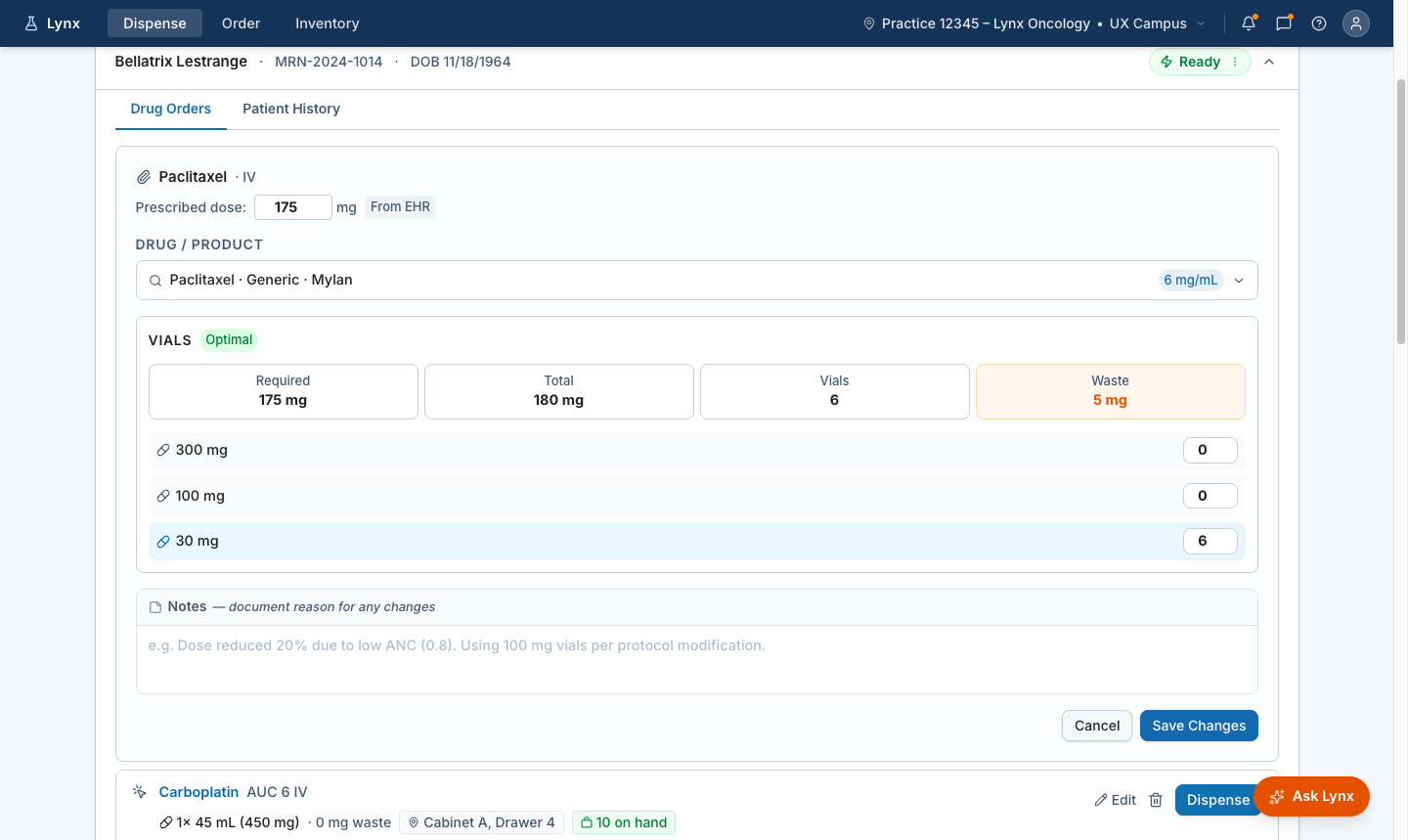
For high-cost medications, vial selection is both an operational and financial decision. The prototype recommends an optimal vial combination, makes waste visible, and allows staff to adjust the recommendation when real-world conditions require it. The system carries the change forward so downstream users can see that the dispense work was adjusted.

Future-state Lynx vial recommendation screen showing prescribed dose, optimal vial combination, total dose, vial count, and expected waste.
Recommended vial mix Lynx suggests an optimal combination based on the prescribed dose.
Waste visibility Required dose, total dose, vial count, and expected waste are visible at the moment of decision.
User override Staff can adjust the recommendation when inventory, practice rules, or clinical context require a different mix.
Reason for change Notes support documentation when the user changes the recommendation.

Lynx recommends an optimal vial combination for the prescribed dose, making total dose, vial count, and expected waste visible before dispense.

Future-state Lynx vial recommendation screen showing a modified vial selection with recalculated total dose and waste.

Override with recalculated waste

When staff change the recommended vial mix, Lynx recalculates total dose and waste immediately so the impact of the change is visible before saving.

Future-state Lynx dispense screen showing an adjusted medication row after a vial recommendation was changed.

Adjusted state carried forward

The updated vial configuration carries into the dispense workflow with a clear adjusted state, so downstream users can see the recommendation changed.

When staff adjust the recommended vial mix, Lynx recalculates waste immediately and carries the change forward into the dispense workflow with a clear adjusted state.

Validation & Success Criteria

Building confidence before customer validation

Because this work is pre-alpha, outcomes are framed as intended outcomes, validation questions, and future measurement areas rather than finalized performance results. The prototype was reviewed with Customer Success and Account Managers to understand whether the readiness model reflected practice workflows, where the concept needed clarification, and what questions should be taken into customer validation.

What changed through internal review

Visible reasoning

Reviewers needed to see why the system recommended an action and where users could approve, adjust, or override.

Role-aware density

Remote coordinators needed aggregate visibility; point-of-care users needed focused confirmation.

Lower day-of overhead

The workflow needed to reduce interaction burden during live clinical administration.

Flexible order visibility

The concept needed to support sites where orders are available day-of or where no EHR integration exists.

Questions for customer validation

Readiness visibility

Can users see who is ready, who is blocked, and what is missing?

Medication demand

Can staff understand what medications may be needed before treatment day?

Vial recommendation trust

Can users understand why a vial recommendation was made?

Human oversight

Can users identify where review, adjustment, or override is required?

Workflow fit

Does the concept match how clinics prepare across different customer setups?

Operational burden

Does the workflow reduce reliance on reports, spreadsheets, Customer Center, and memory?

Why internal review came first

Account Managers and Customer Success understand practice-level workflows, implementation realities, and recurring customer pain points. Their review helped focus the customer validation plan before engineering commitment.

Internal review with Customer Success and Account Managers helped clarify where the readiness model aligned with practice workflows, where the concept needed refinement, and what questions to take into customer validation.

Strategic Impact & Future Direction

How the work shaped modernization beyond the prototype

Leadership Alignment

Aligning Product, Engineering, Customer Success, Account Management, and UX around a shared problem definition before engineering commitment became part of the deliverable. It changed the conversation from what Queue should look like to what treatment readiness needed to become.

Product direction

  • Established treatment readiness as the modernization anchor for Lynx
  • Shifted the conversation from Queue cleanup to a readiness-driven workflow model

Information architecture

  • Moved the team from legacy pages and reports to clearer workflow moments
  • Planning · Readiness review · Medication demand · Vial guidance · Exception recovery · Dispense

Cross-functional alignment

  • Product · Engineering · Customer Success · Account Management · UX
  • Shared problem definition established before engineering commitment

Validation approach

  • Live prototypes validated with Customer Success and Account Managers before customer sessions
  • Concept direction confirmed before engineering commitment

Design system input

  • Reusable patterns identified for: readiness states, recommendation explanation, human review, exception recovery
  • Foundation for future AI-supported workflow patterns across Lynx

Operational workflow model

  • Defined advance medication planning, ordering preparation, and dispense readiness as distinct workflow moments
  • Helps teams design beyond the legacy Queue and account for how practices actually prepare treatment days

Related work — AI-Assisted Design Delivery Pipeline

The Treatment Readiness prototype informed the AI-assisted design delivery pipeline and the emerging Lynx design system, including reusable patterns for decision support, human review, and exception recovery. Building an AI-Assisted Design Delivery Pipeline →

Future direction — Ask Lynx

Ask Lynx builds on the same modernization direction: helping users find information, understand changes, recover from exceptions, and navigate complex workflows without replacing clinical judgment. The opportunity is not to automate clinical decisions — it is to help users understand what changed, what matters, and what action they can take next.

What This Changed

Research revealed that the Queue was acting as a manual planning layer for treatment readiness — and that most of that planning happened outside Lynx. That insight shifted the modernization direction from improving a high-traffic page to reframing the entire workflow around readiness.

Who is ready. What is blocked. What medication may be needed. Which vial configuration is recommended. Where human review is required. The system carries the calculation. Humans retain review, adjustment, and control.